Smart Home Calendar | Should You Invest in One ?
Life can seem like a chaotic mess at times. Call, meetings, grocery run, dinner plan, school drop offs…. The list never seem to end and can be extremely overwhelming.
Managing a household in today’s always-on world feels like a full-time job. If your fridge is cluttered with sticky notes, notes app in your phone a big chaotic scramble and your brain with mental checklists, it might be time to upgrade how you organize your days. That’s where a smart home calendar comes in. It is an intuitive, shared, and few with even voice-controlled scheduling system (big plus while driving) designed to fit right into your digital lifestyle.
There’s something uniquely powerful about having your calendar accessible at any moment, no matter where you are or what you’re doing. Instead of looking for your beloved diary & navigating across apps. Smart calendars reduce friction in planning and communication.
What do we mean by a smart home calendar & who is it for ?
A smart home calendar is a digital scheduling tool integrated into your smart ecosystem—meaning it works with your voice assistants (like Alexa or Google Assistant), syncs across family devices, and in some cases, lives on smart displays in your kitchen or hallway.
Smart calendars bring transparency to busy households. Everyone can see what’s happening and when, minimizing double bookings, missed appointments, and forgotten obligations. Smart displays, like those from Amazon or Google, even allow color-coding schedules by person, so your family knows exactly whose turn it is to take the dog for a walk, a must in my household.
According to a Statista 2024 smart home report, over 60% of U.S. households with smart speakers now use them for scheduling or reminders. With younger parents juggling hybrid work and kids’ school activities, demand for smart home calendar solutions is skyrocketing.
It’s not just limited to families. Couples, roommates, and even single professionals can find great utility for smart calendars. With real-time notifications and cross-platform syncing, your calendar becomes more than just a list which you have to manually check.
Read more: Got an iphone ? You may be able to get compensated from Apple!
Best Devices for Smart Home Calendar
Here are some of the most user-friendly and powerful options to get started:
1. Echo Show 15 – The Ultimate Family Organizer
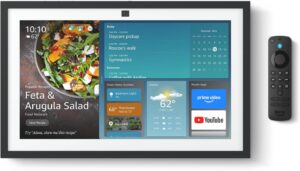
The Amazon Echo Show 15 is one of the most complete smart calendar hubs out there. With a 15.6” display that mounts on your wall like a digital bulletin board, it supports Alexa widgets, including sticky notes, to-do lists, and shared calendars.
- Best for: Busy households that need visual scheduling
- Features: Alexa voice control, personal sticky notes, customizable widgets, shared calendars, Face ID login
- What’s to love: Kids can leave notes, and it acts as a hub for both smart home controls and schedules.
- What it lacks: No native integration with Google Calendar—better suited for Amazon ecosystem users
- Cost: $299.99
2. Google Nest Hub Max – For Google Calendar Power Users
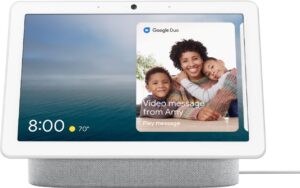
If your family runs on Gmail and Google Calendar, the Nest Hub Max is your dream device. It integrates tightly with your existing Google accounts, letting you view events, create calendar entries, and even get reminders based on your habits.
- Best for: Google-centric households
- Features: Google Assistant, calendar syncing, Face Match, gesture controls, YouTube tutorials for meal prep
- What’s to love The screen is bright and adaptive, making it ideal for any room—especially kitchens.
- What it lacks: No Amazon Alexa support,
- Cost: $299
3. Skylight Calendar – Dedicated Smart Family Calendar
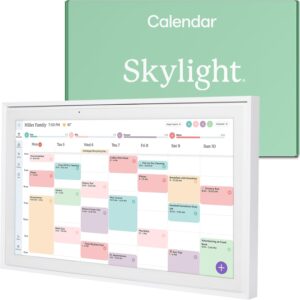
Unlike multi-use devices, the Skylight Calendar focuses purely on family organization. Its 10-inch touchscreen connects with Google, Outlook, Apple Calendar, and Cozi, offering a focused space just for your schedule.
- Best for: Families that want a simple, calendar-first interface
- Features: Color-coded schedules, meal planning, chore charts, offline access
- What’s to love: It doesn’t overwhelm with other apps—this one’s all about the calendar.
- What it lacks: No voice assistant or smart home integration; limited to calendar functions only
- Cost: $319.99
Here are couple of budget friendly options too:
4. Echo Show 8 – Big Features in a Mid-Size Frame

The Echo Show 8 is a great middle-ground for anyone who wants a smart home calendar without needing to mount a massive display. With an 8” HD screen, it handles calendars, reminders, routines, and more, while also offering entertainment and smart home integration. It supports personal calendar syncing via Alexa and can display upcoming events right on your home screen.
Best for: Users with limited space who still want visual scheduling tools
Features: Alexa voice control, smart calendar access, routines, video calling, music and streaming support
What’s to love: It’s versatile enough to sit on a kitchen counter or office desk and still serve as a hub for both scheduling and entertainment.
What it lacks: No wall-mount design or widget dashboard like the Echo Show 15
5. Echo Show 5 – Compact and Budget-Friendly

For those on a tight budget or looking for a bedside or dorm room device, the Echo Show 5 offers the essential smart home calendar tools in a small, 5.5” package. You can ask Alexa about your daily schedule, set reminders, and even link your Google or Microsoft calendar, but don’t expect an elaborate dashboard or shared family tools.
Best for: Personal use in bedrooms, dorms, or minimal setups
Features: Voice access to calendar, smart assistant, compact design, alarm clock functionality
What’s to love: It’s the most affordable Alexa display that still helps you stay on top of your schedule and routines.
What it lacks: No visual calendar dashboard or multiple user profiles; screen may be too small for busy families
Tips to Make the Most of Your Smart Home Calendar
- Color-code each family member for quick visual reference.
- Use voice commands regularly – it reinforces the habit and makes updates instant.
- Set recurring routines like for you workout sessions.
- Display it in a central location where everyone passes by.
Final Thoughts: Organize Smarter, Live Better
A smart home calendar isn’t just about appointments, it’s about peace of mind. Just one glance (or one voice command) and you’re in sync with everyone who matters.Whether you’re managing a family of five or just want to streamline your solo schedule, investing in a smart calendar setup is a small upgrade that can have a huge impact.
If you’re ready to get started, products like the Echo Show 15, Google Nest Hub Max, and Skylight Calendar are excellent options. Add one to your space, link your calendars, and watch as the clutter of life begins to untangle.
Let your schedule work for you—not the other way around.
About the Author: Aditi Sharma

Disclaimer
Techizta publishes content submitted by third-party agencies, partners, and clients. Any such posts are categorized and tagged accordingly:
- Sponsored Content: Posts labeled as "Sponsored" are paid placements submitted by third-party agencies or clients. Techizta does not endorse or express any views regarding the information contained in these posts. The opinions expressed belong solely to the respective authors and do not reflect the official policy or position of Techizta.
- Press Releases: Posts labeled as "Press Release" are paid PR submissions provided by our partners and clients. These are published as received and should be considered as promotional content.
The information provided in such posts is strictly for informational purposes only and should not be interpreted as buying recommendation, or professional advice. Techizta does not recommend, endorse, or promote any specific products, services, or companies mentioned. Readers are strongly encouraged to conduct independent research and consult with a qualified professional before making any decisions.
Additionally, all featured images accompanying such posts are intended as creative depictions of the subject matter. There is no intent to offend or misrepresent any individual, institution, or entity. If any content or imagery is found to be objectionable, please reach out to us at [email protected], and we will promptly review the concern.




Get Smart Insights In Inbox
Stay ahead of the curve with expert analysis and latest smart tech updates.