Top DJI Osmo Pocket 3 Accessories Every Filmmaker Needs in 2025!
The DJI Osmo Pocket 3 is a compact and powerful camera that has quickly become a favorite among filmmakers, vloggers, and adventurers. Its small size and impressive features make it perfect for capturing high-quality footage anywhere you go. But to really get the most out of your DJI Osmo Pocket 3, you need some essential accessories. In this article, we’ll look at the must-have DJI Osmo Pocket 3 accessories that can enhance your filming experience and help you create professional-quality content with ease.
Key Takeaways
- Investing in accessories like the Ulanzi PK-06 Expansion Adapter can boost your filming capabilities.
- Filters such as the Ulanzi PK-03 ND Magnetic Filters Kit can help you achieve stunning visual effects.
- Stabilization tools, including the Ulanzi MT-05 Mini Handheld Tripod, are crucial for smooth footage.
- Power solutions like the BG-3 Power Handgrip ensure you can shoot longer without interruptions.
- Audio enhancements, including external microphones, can significantly improve sound quality.
Essential Accessories for Enhanced Filmmaking
Ulanzi PK-06 Expansion Adapter
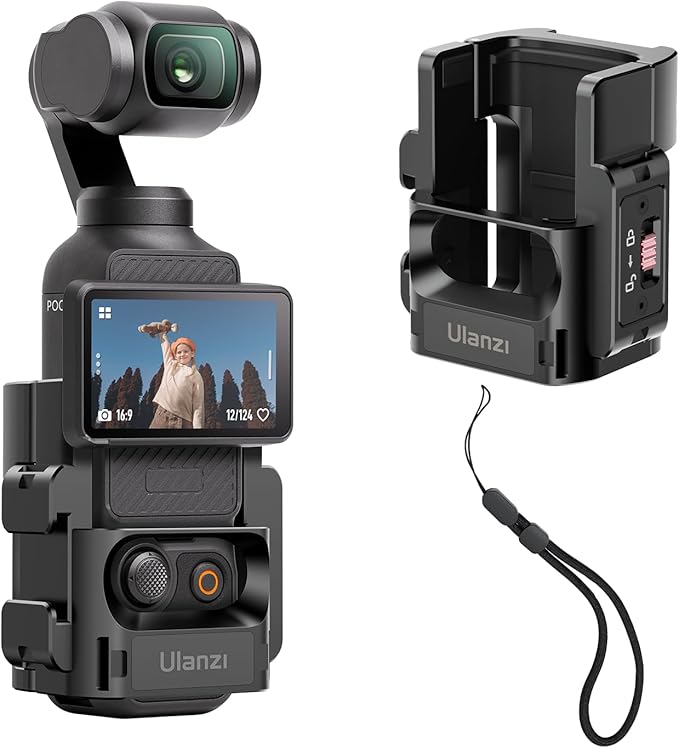
So, you’ve got the DJI Osmo Pocket 3, huh? Cool. But let’s be real, straight out of the box, it’s good, but it could be better. That’s where the Ulanzi PK-06 Expansion Adapter comes in. Think of it as the Swiss Army knife for your Osmo Pocket 3. It basically opens up a whole new world of possibilities. I remember when I first got mine, I was like, “Okay, now what can I actually do with this?”
- More mounting points for microphones.
- Extra spots for lights.
- Places to stick other accessories.
It’s a game changer. It’s durable, versatile, and honestly, pretty cheap for what it does.
Ulanzi PK-03 ND Magnetic Filters Kit
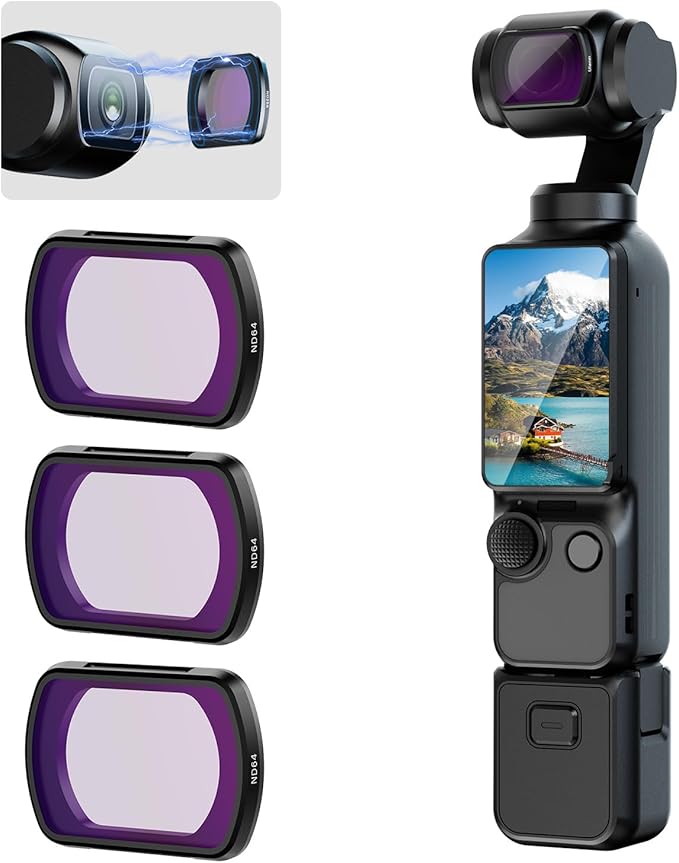
Okay, next up: filters. Specifically, the Ulanzi PK-03 ND Magnetic Filters Kit. If you’re shooting outdoors, especially on bright days, these are a must. ND filters are like sunglasses for your camera. They cut down the amount of light hitting the sensor, which lets you shoot at wider apertures and slower shutter speeds, even in bright sunlight. This means you can get that nice, blurry background (bokeh) and smooth motion blur without overexposing your footage. The magnetic design makes swapping filters a breeze. No more screwing around with tiny threads! Here’s why I think they’re great:
- Easy to swap.
- Protect your lens.
- Allow for creative control in bright light.
I was filming a skateboarding video last week, and the sun was just blasting everything. Without the ND filters, the footage would have been totally blown out. But with them, I was able to get some really cinematic shots with that sweet motion blur. Trust me, these filters are worth their weight in gold.
Ulanzi PK-01 Black Mist Filter
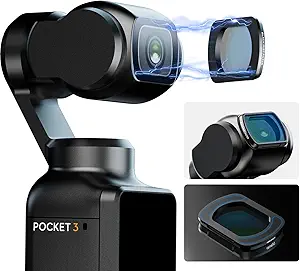
Alright, last but not least, let’s talk about the Ulanzi PK-01 Black Mist Filter. This one’s all about adding a little bit of magic to your footage. It gives your video a dreamy, ethereal look by softening the highlights and reducing contrast. It’s perfect for portraits, weddings, or any time you want to create a more romantic or cinematic feel. I’ve found it particularly useful for taming harsh digital edges and making skin tones look smoother. It’s subtle, but it makes a big difference. The Ulanzi PK-04 Carrying Bag is also a great addition to keep your filters safe.
Here’s a quick rundown:
- Softens highlights.
- Reduces contrast.
- Creates a dreamy look.
Stabilization Tools for Smooth Footage
Getting smooth, stable video is super important, right? Especially if you’re moving around a lot. The Osmo Pocket 3 has built-in stabilization, but sometimes you need a little extra help to get that professional look. Let’s check out some tools that can make a big difference.
Ulanzi MT-05 Mini Handheld Tripod
A mini tripod is a simple but effective way to improve stability. The Ulanzi MT-05 is small enough to carry around easily, and it can be used as a handheld grip or set down on a surface for stationary shots. It’s great for time-lapses or when you need to keep the camera steady for longer periods. Plus, it’s way better than just trying to hold the camera perfectly still – trust me, your arms will thank you.
SmallRig Mini Shock Absorber Arm
Okay, this one’s a bit more advanced. If you’re dealing with vibrations or bumpy surfaces, a shock absorber arm can be a lifesaver. The SmallRig Mini Shock Absorber Arm helps to isolate the camera from movements, resulting in smoother footage. It’s especially useful when you’re mounting the Osmo Pocket 3 on a vehicle or using it in other situations where there’s a lot of motion. It might seem like overkill, but the difference it makes in reducing unwanted shake is pretty noticeable.
DJI Osmo Pocket 3 Gimbal Stabilizer
While the Osmo Pocket 3 already has a built-in gimbal, sometimes you might want even more stability. An external gimbal stabilizer can provide an extra layer of smoothness, especially in challenging shooting conditions. These stabilizers often come with different modes and settings, allowing you to fine-tune the stabilization to your specific needs. It’s an investment, but if you’re serious about getting professional-quality footage, it can be worth it.
Here’s a quick comparison of stabilization methods:
- Built-in Gimbal: Good for everyday use.
- Mini Tripod: Best for stationary shots.
- Shock Absorber Arm: Ideal for reducing vibrations.
- External Gimbal: Provides maximum stability in difficult conditions.
Power Solutions for Extended Shooting
One of the biggest limitations with small cameras like the DJI Osmo Pocket 3 is battery life. Thankfully, there are several power solutions available to keep you shooting for longer. Let’s explore some options.
BG-3 Power Handgrip
The Ulanzi BG-3 Power Handgrip is a game-changer for extended shoots. It not only provides a comfortable grip but also packs a significant battery boost. This accessory essentially turns your Osmo Pocket 3 into an endurance machine. Think of it as a power bank specifically designed for your camera. It even comes with a mini tripod for added stability, which is a nice bonus. I’ve found it particularly useful when filming time-lapses or any static shot where I don’t want to worry about the camera tipping over. The ergonomic design is a plus, making those long filming sessions much more bearable. It can get a little warm during extended 4K shoots, but the added battery life is worth it.
Portable Battery Packs
Portable battery packs are another versatile option. You can use them to charge your Osmo Pocket 3 on the go, or even power it while it’s mounted. The key here is to choose a power bank with sufficient capacity and output. Look for one with Power Delivery (PD) for faster charging speeds. I usually carry a couple of these in my bag, just in case. They’re not as integrated as the power handgrip, but they offer more flexibility since you can use them to charge other devices as well. Just make sure you have the right cables!
Charging Docks for DJI Osmo Pocket 3
Charging docks are great for keeping your Osmo Pocket 3 organized and ready to go. They typically allow you to charge the camera and extra batteries simultaneously. This is especially useful if you have multiple batteries and want to keep them all topped off. I have a small charging dock on my desk, and it’s a lifesaver. It’s much more convenient than plugging the camera directly into a wall charger. Plus, some docks even have storage compartments for accessories, which helps keep everything tidy. It’s a simple but effective way to manage your power needs.
Storage and Protection Accessories
Okay, so you’ve got your Osmo Pocket 3 and a bunch of cool accessories. Now, how do you keep it all safe? That’s where storage and protection come in. Let’s face it, this stuff isn’t cheap, and a broken lens or a scratched screen can ruin your day (and your footage).
PK-04 Carrying Bag
First up, a good carrying bag is a must. I mean, are you really going to just toss your Osmo Pocket 3 into your backpack with your keys and loose change? Probably not a good idea. The PK-04 Carrying Bag is designed specifically for the Osmo Pocket 3 and its accessories. It has custom compartments to keep everything organized and protected from bumps and scratches. It’s small enough to be portable, but big enough to hold the essentials. Think of it as a little home for your filmmaking gear.
Waterproof Cases for DJI Osmo Pocket 3
If you’re planning on shooting anywhere near water, a waterproof case is non-negotiable. Whether you’re filming at the beach, by the pool, or even just in the rain, you need to protect your Osmo Pocket 3 from water damage. These cases are usually made of tough plastic and have a watertight seal. Just make sure you test it before you go diving! I’ve seen too many people learn the hard way that “water-resistant” isn’t the same as “waterproof”.
Lens Caps and Screen Protectors
These are the unsung heroes of camera protection. A simple lens cap can prevent scratches and dust from ruining your lens, and a screen protector can save your display from cracks and scuffs. They’re cheap, easy to install, and can save you a lot of headaches down the road. I always recommend getting these as soon as you get your Osmo Pocket 3. It’s like putting a case on your phone – you just do it. Speaking of which, you might want to check out some AirPods 4 tips to keep those safe too.
Think of storage and protection accessories as an investment. A little bit of money spent now can save you a lot of money (and frustration) later. Plus, it’ll keep your gear in good condition, which means better footage and a longer lifespan for your Osmo Pocket 3.
Here’s a quick rundown of why these accessories are important:
- Protection from physical damage (scratches, bumps, drops)
- Protection from the elements (water, dust, sand)
- Organization and portability
Creative Filters for Cinematic Effects
Filters can really change the feel of your videos. They’re not just about protecting your lens; they can add a specific mood or style to your footage. Let’s look at some filter options for the Osmo Pocket 3.
Polarizing Filters for Enhanced Color
Polarizing filters are great for outdoor shots. They cut down on glare and reflections, which can really make colors pop. Think about shooting a landscape with a bright blue sky and fluffy white clouds. A polarizing filter will deepen the blue and make the clouds stand out more. They’re also useful for filming near water, as they can reduce reflections on the surface. If you want to create travel content, these filters are a must.
Graduated ND Filters for Landscape Shots
Graduated Neutral Density (ND) filters are super useful when you’re filming scenes with a big difference in brightness, like a sunset. The filter is darker on top and gradually gets lighter, so you can darken the bright sky without making the ground look too dark. This helps balance the exposure and prevents the sky from being overexposed. It’s a simple way to get more detail in both the sky and the foreground. The Ulanzi PK-03 ND Magnetic Filters Kit is a great option for this.
UV Filters for Lens Protection
UV filters are primarily for protecting your lens from scratches and dust. While they do block some UV light, modern cameras already have UV filters built in, so the effect is minimal. However, they’re still a good idea to have as a first line of defense for your lens. Think of it like a screen protector for your phone. Plus, the Ulanzi PK-01 Black Mist Filter also offers enhanced protection for your lens.
Mounting Solutions for Versatile Shooting
Getting the right mount can seriously change how you use your DJI Osmo Pocket 3. It’s not just about holding the camera; it’s about opening up new angles and creative possibilities. Let’s look at some options.
Action Camera Mounts
These mounts are built for movement. Think about attaching your Osmo Pocket 3 to a helmet for a first-person perspective while biking, or securing it to a car for dynamic travel shots. The key here is stability and a strong grip. You want something that can handle bumps and vibrations without shaking your footage to pieces. Some mounts use suction cups, others use adhesive, and some even clamp onto bars or rails. SmallRig, for example, makes a magnetic mount stand that’s compatible with action cameras.
Tripod Adapters for Stability
Sometimes, you just need a steady shot. That’s where tripod adapters come in. These little gadgets let you attach your Osmo Pocket 3 to a regular tripod, which is great for time-lapses, interviews, or any situation where you need to keep the camera perfectly still. A good tripod adapter should be sturdy and easy to use, with a secure locking mechanism to prevent the camera from wobbling. Look for ones made from metal rather than plastic for extra durability. The Ulanzi MT-05 Mini Handheld Tripod is a great option for shooting in conditions that demand precision and steadiness.
Selfie Sticks for Dynamic Angles
Don’t underestimate the power of a good selfie stick. It’s not just for selfies! A selfie stick can give you extra reach for overhead shots, low-angle perspectives, or smooth panning movements. Look for one that’s lightweight, extendable, and has a comfortable grip. Some even come with built-in controls for starting and stopping recording, which can be super handy. A selfie stick can help you get dynamic angles that would be impossible to achieve otherwise.
Mounting solutions are more than just accessories; they’re tools that expand your creative toolkit. By choosing the right mount for the job, you can capture unique perspectives and professional-looking footage with your DJI Osmo Pocket 3.
Audio Enhancements for Professional Sound
Okay, so the Osmo Pocket 3 is pretty awesome for video, but let’s be real, the built-in mic? Not always the best. If you’re serious about filmmaking, you’re gonna need to up your audio game. Here’s how:
External Microphones for Clear Audio
First up, external mics. The difference they make is night and day. Think about it: the built-in mic is picking up everything – wind noise, background chatter, your own breathing. An external mic lets you focus on the sound you actually want. I’ve seen people use everything from lav mics for interviews to shotgun mics for capturing ambient sound. The key is finding one that fits your needs and budget. I’ve heard good things about the Rode Wireless Go II, but there are tons of options out there. You can find a wide variety of microphones online.
Windshields for Outdoor Recording
Speaking of wind noise, if you’re shooting outdoors, a windshield is non-negotiable. Seriously, don’t even think about skipping this. Wind can ruin otherwise perfect footage. Those little fuzzy covers that slip over your mic? They’re lifesavers. I remember one time I was filming a sunset at the beach, and the wind was howling. Without a windshield, the audio would have been completely unusable.
Audio Adapters for Enhanced Connectivity
Alright, so you’ve got your fancy external mic, but how do you connect it to the Osmo Pocket 3? That’s where audio adapters come in. The Osmo Pocket 3 uses a USB-C port, so you’ll likely need an adapter to connect a standard 3.5mm mic. Make sure you get a good quality adapter, because a cheap one can introduce noise and interference. Also, check if the adapter provides power to the mic (plug-in power), as some mics require it.
Getting good audio can be tricky, but it’s worth the effort. Bad audio can ruin even the most visually stunning footage. Take the time to invest in the right equipment and learn how to use it properly. Your audience will thank you for it.
Here’s a quick rundown of things to consider:
- Microphone Type: Lav, shotgun, on-camera – choose what fits your shooting style.
- Connectivity: USB-C adapter is a must.
- Power: Does your mic need power? Does the adapter provide it?
- Wind Protection: Don’t leave home without it!
Final Thoughts on DJI Osmo Pocket 3 Accessories
In summary, the DJI Osmo Pocket 3 is a fantastic tool for anyone looking to create high-quality videos. However, to really make the most of it, having the right accessories is key. Each accessory we’ve discussed, from the Ulanzi PK-06 Expansion Adapter to the MT-05 Mini Handheld Tripod, brings something unique to the table. They not only improve your filming experience but also open up new ways to express your creativity. Whether you’re a seasoned filmmaker or just starting out, these accessories can help you capture your vision more effectively. So, consider adding them to your kit and see how they can transform your projects.
Frequently Asked Questions
What accessories do I need for the DJI Osmo Pocket 3?
To get the best out of your DJI Osmo Pocket 3, consider accessories like the Ulanzi PK-06 Expansion Adapter, ND Filters, a power handgrip, and a mini tripod.
How can I stabilize my footage with the Osmo Pocket 3?
You can use stabilizers like the Ulanzi MT-05 Mini Handheld Tripod or the DJI Osmo Pocket 3 Gimbal Stabilizer to keep your shots smooth.
What are the best power solutions for long shoots?
For extended shooting, look for the BG-3 Power Handgrip, portable battery packs, and charging docks specifically designed for the DJI Osmo Pocket 3.
How do I protect my DJI Osmo Pocket 3?
To protect your camera, use a carrying bag, waterproof cases, and lens caps to keep it safe from damage.
What filters can enhance my video quality?
Using creative filters like polarizing filters, graduated ND filters, and UV filters can greatly improve the quality and look of your videos.
Can I improve the audio quality of my videos?
Yes! You can connect external microphones, use windshields for outdoor recording, and audio adapters to enhance the sound quality of your recordings.
About the Author: Editor's Desk

Disclaimer
Techizta publishes content submitted by third-party agencies, partners, and clients. Any such posts are categorized and tagged accordingly:
- Sponsored Content: Posts labeled as "Sponsored" are paid placements submitted by third-party agencies or clients. Techizta does not endorse or express any views regarding the information contained in these posts. The opinions expressed belong solely to the respective authors and do not reflect the official policy or position of Techizta.
- Press Releases: Posts labeled as "Press Release" are paid PR submissions provided by our partners and clients. These are published as received and should be considered as promotional content.
The information provided in such posts is strictly for informational purposes only and should not be interpreted as buying recommendation, or professional advice. Techizta does not recommend, endorse, or promote any specific products, services, or companies mentioned. Readers are strongly encouraged to conduct independent research and consult with a qualified professional before making any decisions.
Additionally, all featured images accompanying such posts are intended as creative depictions of the subject matter. There is no intent to offend or misrepresent any individual, institution, or entity. If any content or imagery is found to be objectionable, please reach out to us at [email protected], and we will promptly review the concern.


Get Smart Insights In Inbox
Stay ahead of the curve with expert analysis and latest smart tech updates.