Acer Aspire 3 | Budget King for Students
If you’re looking for a laptop that won’t make your wallet cry? The Acer Laptop Aspire 3 is your 2025 go-to, starting at just $299.99, perfect for students typing essays, professionals handling emails, or anyone streaming their favorite shows. Launched in February 2023 with 2025 refreshes, it’s a budget champ with updated AMD Ryzen 3/7320U, Ryzen 5/7520U, or Intel Core i3-N305 processors, offering solid performance for everyday tasks. Whether you’re a first-time buyer or just want a reliable sidekick, let’s break down why the Aspire 3 will be a super reliable pick, explain those techy terms like Ryzen and N305 and share what you need to know before you snag one.
The Acer Aspire 3 debuted in February 2023 in Asia markets with U.S. availability shortly after, priced from $350. Acer rolled out 2025 updates with newer configurations, like AMD Ryzen 5 7520U and 16GB RAM options, hitting shelves by January 2025. These tweaks keep it fresh for budget buyers, with deals often popping up on Amazon and Best Buy !
Read More: Father’s Day Gifts that you don’t want to sleep on
What You Need to Know About the Acer Aspire 3
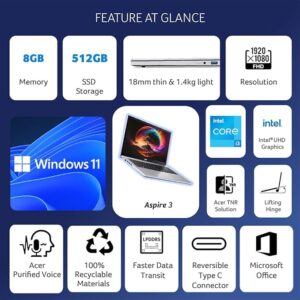
The Aspire 3 is all about value, delivering enough power for daily tasks without fancy frills. Here’s what matters to you as a buyer:
- Performance and Processors: The 2025 Acer Aspire 3 offers AMD Ryzen 3 7320U or Intel Core i3-N305 processors, paired with 8GB LPDDR5 RAM and up to 512GB PCIe NVMe SSD storage.
-
So what’s AMD Ryzen or Intel Core i3-N305 Processor?
Think of a processor as your laptop’s brain. The AMD Ryzen 3 7320U (or Ryzen 5 7520U) is like a zippy worker who handles tasks like web browsing, Word docs, or YouTube smoothly. It’s a four-core chip, meaning it can juggle multiple apps without much sweat, and it’s power-efficient for longer battery life.
The Intel Core i3-N305 is another budget brain with eight cores but simpler “efficiency” cores, great for basic stuff like emails or Zoom but slower for complex tasks like video editing.
Both are perfect for schoolwork, streaming, or light apps but won’t handle heavy gaming or pro software like Photoshop Choose Ryzen for slight gaming edge, i3 for simplicity.-
Pro: Fast enough for school, work, or Netflix.
-
Con: Struggles with heavy apps or too many tabs
-
-
Display: A 15.6-inch (or 14-inch) Full HD (1920×1080) IPS display offers sharp visuals for videos or presentations.
-
Pro: Acer’s BlueLightShield cuts eye-straining blue light by ~30%. It is great for movie nights or group projects, but it’s dim (250–300 nits) for outdoor use.
-
Con: Not bright enough in sunlight
-
-
Battery Life: A 40 to 50Wh battery lasts 6 to 8 hours for browsing or videos, with 65W charging hitting 50% in ~45 minutes. It covers a school day or workday but needs plugging in for heavy use.
Con: Trails premium laptops’ 10+ hours. -
Design and Ports: At 3.88 lbs (15.6-inch) or 3.1 lbs (14-inch) and 0.74 inches thick, it’s portable with a plastic but sturdy silver or charcoal body. Ports include USB-C (some models charge via USB-C), USB-A, HDMI, and headphone jack. It is easy to carry to class and connects to monitors or projectors.
-
Pro: Wide port selection for budget price. At under 4 lbs, it’s easy to toss in a backpack for class or coffee shop work yet sturdy enough to take a bump (or two)
-
Cons: The plastic body feels cheap compared to metal-clad rivals like the HP Pavilion.
-
-
Extras:
Wi-Fi 6 for fast internet, a 720p webcam with noise-canceling mics for clear Zoom calls, and Windows 11 Home with Cortana voice wake-up. Some models have a numeric keypad or 180-degree hinge for sharing.
Recommended Configurations
Pick these Aspire 3 models for your needs:
- Acer Aspire 3 (Ryzen 5, 8GB, 512GB, $389.99): Best for students needing storage for docs and media.
- Acer Aspire 3 (Intel i3, 8GB, 256GB, $299.99): Budget pick for basic tasks like browsing.
- Acer Aspire 3 (Ryzen 7, 16GB, 512GB, $489.99): Power user’s choice for multitasking.
Acer Aspire 3 Specs Table
|
Feature |
Details |
|---|---|
| Processor | AMD Ryzen 3 7320U / Ryzen 5 7520U / Intel Core i3-N305 |
| Display | 14″ or 15.6″ Full HD IPS, BlueLightShield |
| Battery | 40 to 50Wh, 6 to 8 hours, 65W charging |
| RAM/Storage | 8–16GB LPDDR5 / 128GB–1TB PCIe NVMe SSD |
| Weight/Thickness | 3.1–3.88 lbs / 0.74 inches |
| Price | $299.99 to $499.99 |
Why the Acer Aspire 3 is the Budget King
The Aspire 3’s sub-$400 price tag makes it a steal for students and pros, outshining Chromebooks with its Windows 11 flexibility. Users praise its value, with users raving about snappy performance for schoolwork. But it’s not flawless. Don’t expect gaming chops or MacBook-level polish. Its SSD and IPS display punch above its weight, though battery life and build quality lag behind $600+ laptops. For budget buyers, it’s a smart pick, especially with 2025’s Ryzen 5 option for power users. Use Microsoft 365 for essays, LibreOffice for free docs, or Canva for presentations – it handles them all.
Note: The article has Amazon affiliate links.
About the Author: Aditi Sharma

Disclaimer
Techizta publishes content submitted by third-party agencies, partners, and clients. Any such posts are categorized and tagged accordingly:
- Sponsored Content: Posts labeled as "Sponsored" are paid placements submitted by third-party agencies or clients. Techizta does not endorse or express any views regarding the information contained in these posts. The opinions expressed belong solely to the respective authors and do not reflect the official policy or position of Techizta.
- Press Releases: Posts labeled as "Press Release" are paid PR submissions provided by our partners and clients. These are published as received and should be considered as promotional content.
The information provided in such posts is strictly for informational purposes only and should not be interpreted as buying recommendation, or professional advice. Techizta does not recommend, endorse, or promote any specific products, services, or companies mentioned. Readers are strongly encouraged to conduct independent research and consult with a qualified professional before making any decisions.
Additionally, all featured images accompanying such posts are intended as creative depictions of the subject matter. There is no intent to offend or misrepresent any individual, institution, or entity. If any content or imagery is found to be objectionable, please reach out to us at [email protected], and we will promptly review the concern.



Get Smart Insights In Inbox
Stay ahead of the curve with expert analysis and latest smart tech updates.