


Lumma Malware Infects Windows PCs | What You Need to Know & Do
In a startling revelation, Microsoft announced that over 394,000 Windows computers worldwide were infected by the Lumma malware between March 16 and May 16, 2025. This insidious malware, known as Lumma Stealer or LummaC2, has become a go to tool for cybercriminals, targeting sensitive data like passwords, credit card details, bank accounts, and cryptocurrency wallets. Here’s a closer look at what Lumma malware is, how it spreads, how to detect it, and what you can do to protect yourself.
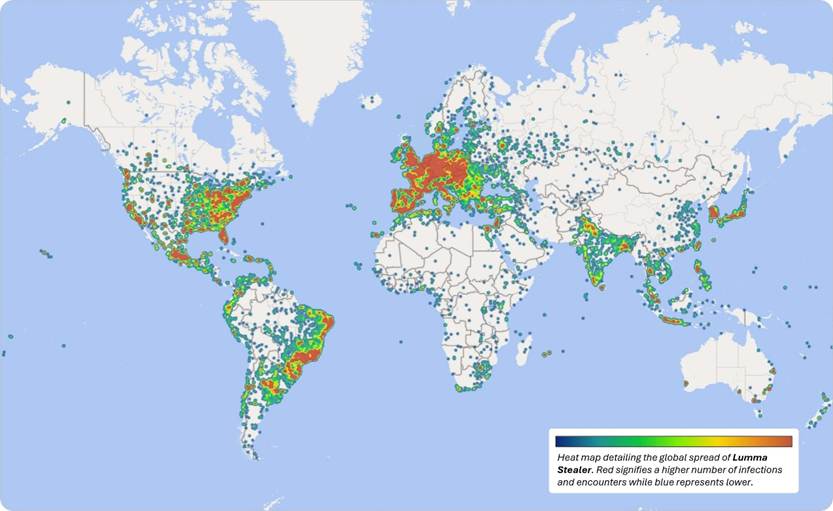
Figure 1. Heat map detailing global spread of Lumma Stealer malware infections and encounters across Windows devices. (Source: Microsoft)
Read More: Major Data Breach – Attack on a US Cloud Provider
What Is Lumma Malware?
Lumma malware is a type of information-stealing malware, or “infostealer,” offered as a Malware-as-a-Service (MaaS). Developed by a Russia-based cybercriminal known as “Shamel,” it’s sold on underground forums like Telegram for subscription fees ranging from $250 to $1,000. Its ease of use, ability to evade detection, and advanced capabilities make it a favorite among hackers.
The malware targets:
-
Browser Data: Steals passwords, cookies, and autofill information from browsers like Google Chrome, Microsoft Edge, and Mozilla Firefox.
-
Cryptocurrency Wallets: Extracts data from wallets such as MetaMask, Electrum, and Exodus.
-
Applications: Harvests credentials from VPNs, email clients, FTP software, and apps like Telegram.
-
Documents: Collects files like PDFs, Word documents, and RTFs from user directories.
-
System Information: Gathers details like CPU data, OS version, and installed applications to profile victims for further attacks.
Lumma’s stealthy design, including techniques like process injection and memory-only execution, makes it hard to detect by traditional antivirus software. Its developers continuously update it, adding features like clipboard hijacking and cryptojacking to maximize its impact.
How Does Lumma Malware Spread & How to Detect It?
Lumma malware spreads through a variety of deceptive tactics, often impersonating trusted brands to trick users. Common delivery methods include:
-
Phishing Emails: Cybercriminals send emails posing as legitimate companies, like Booking.com, urging users to click malicious links or download attachments. A notable March 2025 campaign impersonated Booking.com to steal financial data.
-
Malvertising: Fake ads, such as those for “Chrome update,” lead users to cloned websites that deliver Lumma.
-
Trojanized Applications: Pirated or cracked software often bundles Lumma, executing it silently during installation.
-
Fake CAPTCHA Pages: Users are tricked into copying malicious commands, disguised as CAPTCHA verification, which download Lumma directly into memory.
-
Other Malware: Payloads like DanaBot can drop Lumma as an additional infection.
These multi-vector strategies, combined with Lumma’s ability to rotate domains and leverage legitimate platforms like GitHub, make it a persistent threat.
Detecting Lumma malware can be challenging due to its stealthy nature, but there are signs and tools that can help identify an infection:
-
Unusual System Behavior: Look for sluggish performance, unexpected crashes, or high CPU/memory usage, which may indicate Lumma’s background activities like cryptojacking or data harvesting.
-
Suspicious Network Activity: Monitor outgoing connections to unfamiliar or suspicious IP addresses. Tools like Windows Task Manager or network monitoring software can help identify unusual traffic.
-
Browser Issues: Check for unauthorized extensions, changed homepage settings, or frequent redirects to unknown websites, as Lumma often targets browsers.
-
Antivirus Alerts: Modern antivirus programs, like Microsoft Defender, now flag LummaC2 as a Trojan or suspicious behavior. Run a full system scan with updated antivirus software to detect it.
-
Unexpected Account Activity: If you notice unauthorized logins, missing cryptocurrency, or unfamiliar transactions, Lumma may have stolen your credentials.
-
Check for Malicious Files: Lumma may create files in directories like C:\Users\[YourUsername]\AppData\Local\Temp. Use tools like Malwarebytes to scan for suspicious files or processes.
If you suspect an infection, immediately disconnect your device from the internet to prevent further data theft and proceed with remediation steps outlined below.
The Global Impact of Lumma Malware
Between March 16 and May 16, 2025, Microsoft’s Digital Crimes Unit (DCU) identified over 394,000 infected Windows computers globally. The malware has targeted diverse sectors, including:
-
Education systems, with attacks on institutions
-
Online gaming communities.
-
Critical infrastructure, such as manufacturing, healthcare, logistics, telecommunications, and finance.
The FBI estimates that Lumma facilitated $36.5 million in credit card theft losses in 2023 alone, with up to 10 million infections reported since its emergence in 2022. A heat map from Microsoft shows high infection rates in Europe, the eastern United States, and parts of India, highlighting its widespread reach.
Microsoft’s Response – A Global Takedown
On May 13, 2025, Microsoft’s DCU, in collaboration with the U.S. Department of Justice, Europol, Japan’s Cybercrime Control Center, and tech companies like Cloudflare, Bitsight, Lumen, ESET, and CleanDNS, launched a coordinated operation to dismantle Lumma’s infrastructure. One of the Microsoft official tweeted as well:
LummaC2 / Lumma Stealer takedown 👊: "Microsoft identified over 394,000 Windows computers globally infected by the Luma malware. Working with law enforcement and industry partners, we have severed communications between the malicious tool and victims. Moreover, more than 1,300… pic.twitter.com/wJ9qjY4lBa
— Nick Carr (@ItsReallyNick) May 22, 2025
Key actions take by Microsoft includes:
-
Seizing Domains: Microsoft secured a court order from the U.S. District Court for the Northern District of Georgia to seize 2,300 malicious domains, with 1,300 redirected to Microsoft “sinkholes” for monitoring and analysis.
-
Disrupting Command Structure: The DOJ seized Lumma’s central command-and-control infrastructure and shut down online marketplaces where the malware was sold.
-
Regional Efforts: Europol and Japan’s Cybercrime Control Center suspended locally hosted Lumma infrastructure.
Despite these efforts, Microsoft warns that Lumma’s operators are already attempting to rebuild. The company’s ongoing strategy is to make reconstitution as difficult as possible, leveraging real-time takedowns to disrupt new infrastructure.
What to Do If You’re Infected
If you confirm or suspect a Lumma malware infection, take these immediate steps:
-
Disconnect from the Internet: Prevent further data theft by disconnecting your device from Wi-Fi or Ethernet.
-
Run a Full Antivirus Scan: Use updated antivirus software to identify and quarantine Lumma-related files. Microsoft Defender and tools like Malwarebytes are effective for this.
-
Change Passwords: After ensuring your device is clean, change passwords for all affected accounts from a secure, uninfected device. Use strong, unique passwords and enable MFA.
-
Restore from Backup: If data is lost or encrypted, restore from a recent backup to avoid engaging with cybercriminals.
-
Contact Authorities: Report the infection to the FBI’s Internet Crime Complaint Center (IC3) or your local cybercrime unit. Provide details to aid investigations.
-
Consult Professionals: If you’re unsure how to proceed, hire a cybersecurity professional to clean your system and secure your accounts.
The FBI and Cybersecurity and Infrastructure Security Agency (CISA) offer a technical advisory with detailed remediation steps for Lumma infections.
The Lumma malware takedown is a landmark example of public-private collaboration in combating cybercrime. As Edvardas Šileris, head of Europol’s European Cybercrime Centre, noted, “This operation is a clear example of how public-private partnerships are transforming the fight against cybercrime.” However, Lumma’s resilience underscores the need for ongoing vigilance and layered defenses.
Microsoft emphasizes that while this operation has disrupted Lumma’s operations, the broader evolution of Malware-as-a-Service ecosystems requires continuous innovation. By targeting infrastructure and raising awareness, Microsoft and its partners aim to reduce the profitability of cybercrime and protect global digital infrastructure.
About the Author: Aditi Sharma

Disclaimer
Techizta publishes content submitted by third-party agencies, partners, and clients. Any such posts are categorized and tagged accordingly:
- Sponsored Content: Posts labeled as "Sponsored" are paid placements submitted by third-party agencies or clients. Techizta does not endorse or express any views regarding the information contained in these posts. The opinions expressed belong solely to the respective authors and do not reflect the official policy or position of Techizta.
- Press Releases: Posts labeled as "Press Release" are paid PR submissions provided by our partners and clients. These are published as received and should be considered as promotional content.
The information provided in such posts is strictly for informational purposes only and should not be interpreted as buying recommendation, or professional advice. Techizta does not recommend, endorse, or promote any specific products, services, or companies mentioned. Readers are strongly encouraged to conduct independent research and consult with a qualified professional before making any decisions.
Additionally, all featured images accompanying such posts are intended as creative depictions of the subject matter. There is no intent to offend or misrepresent any individual, institution, or entity. If any content or imagery is found to be objectionable, please reach out to us at [email protected], and we will promptly review the concern.




Get Smart Insights In Inbox
Stay ahead of the curve with expert analysis and latest smart tech updates.
