Microsoft Surface Pro 9 for Creatives – Review of Stylus, Display & Real-World Use
As a generally curious (and slightly nosey) person who enjoys dabbling in digital design, I’ve tested a wide range of devices from iPads to Chromebooks to explore their creative potential. Almost foolishly hoping that one of them will make me appear more creative than I actually am. Recently, I spent hands-on time with the Microsoft Surface Pro 9, focusing on its capabilities for digital drawing, light photo editing, and UI/UX prototyping.
While I’m not a professional designer, I regularly engage with creative tools for personal projects. This review is based on real-world use cases, not synthetic benchmarks, to help you understand whether the Surface Pro 9 truly fits a creative workflow. Though launched in 2022, Surface Pro 9 has really stood test of time –
Quick Verdict
The Surface Pro 9 is a versatile hybrid device that shines for sketching, design ideation, and portable creative work. Below is a snapshot of its key features for creatives:
|
Feature |
Thoughts |
|---|---|
| Stylus Performance | Excellent with Slim Pen 2 – responsive, precise, with satisfying haptic feedback |
| Display | 120Hz, vivid, sRGB – great for most creative tasks, though not AdobeRGB/DCI-P3 |
| Portability | Lightweight (1.94 lbs) and versatile, ideal for on-the-go creatives |
| Performance (Intel) | Smooth with Adobe Photoshop, Affinity Designer, and sketching apps |
| Performance (ARM) | Better battery life, but limited app compatibility for creative software |
| Studio Mode | Ergonomic kickstand design, comfortable for sketching and inking |
Tested Configurations
Tested Model: Microsoft Surface Pro 9 (Intel i5, 16GB RAM, 256GB SSD) with Surface Slim Pen 2 and Signature Keyboard.
Price: Starting at $999 (Intel) or $1,299 (ARM with 5G, prices may vary).
Accessories: Surface Slim Pen 2 + Surface Pro Signature Keyboard
Read More: Expect absolute privacy while using your phone ? Look no more
Stylus Experience
The Surface Slim Pen 2 is a standout feature for creatives, offering a near-natural drawing experience. I tested it with apps like Sketchable, Adobe Photoshop, and Figma for sketching, annotating, and UI mockups. Here’s what I found:
-
Smooth and Accurate Strokes: The pen delivers precise input with no noticeable lag, making it ideal for detailed sketches and annotations.
-
Pressure Sensitivity: With 4,096 pressure levels, brush variations in tools like Photoshop feel nuanced and responsive.
-
Haptic Feedback: The subtle vibration mimics a pen-on-paper feel, enhancing the tactile experience.
-
Convenient Storage: The pen magnetically attaches and charges in the Surface Pro Signature Keyboard, ensuring it’s always ready.
For creatives who rely on stylus input, the Slim Pen 2 rivals high-end styluses like the Apple Pencil, with the added benefit of haptic feedback.
Display Quality
The 13-inch PixelSense Flow Display is a highlight for creative work, balancing portability with visual fidelity. Key specs include:
-
Resolution: 2880 × 1920 (267 PPI), delivering crisp visuals for detailed artwork.
-
Refresh Rate: 120Hz, ensuring smooth pen input and scrolling, which is especially noticeable when sketching or navigating design apps.
-
Color Accuracy: Covers the sRGB gamut with good contrast, suitable for digital art, sketching, and light photo editing.
While the display doesn’t support the wider AdobeRGB or DCI-P3 color gamuts, it’s more than adequate for non-color-critical tasks like sketching, UI design, and blog graphics. As a novice, I didn’t see this as an issue but for professionals requiring precise color grading (e.g., video editors), a dedicated monitor with broader gamut coverage may be necessary.
Intel vs. ARM – A Key Decision
The Surface Pro 9 comes in two variants: Intel (i5/i7) and ARM (Microsoft SQ3). Each has distinct implications for creative workflows:
| Model | Best For | Limitations |
|---|---|---|
| Intel | Adobe Suite, Affinity Designer, multitasking | Slightly shorter battery life (~9-10 hours) |
| ARM (SQ3) | Long battery life (~12-14 hours), 5G connectivity | Limited app compatibility; some apps run slower |
-
Intel Model: I tested Figma, Adobe Lightroom, and Photoshop on the Intel i5 model with 16GB RAM. Performance was smooth, with quick load times and no stuttering during multitasking. This model is ideal for creatives using desktop-grade creative software.
-
ARM Model: The SQ3 variant, tested briefly, excels in battery life and connectivity but struggles with non-optimized apps. For example, some Adobe tools either don’t run natively or perform sluggishly due to emulation. It’s better suited for lighter tasks like note-taking or mobile productivity.
For most creatives, the Intel model is the safer choice unless battery life or 5G is a priority.
Studio Mode
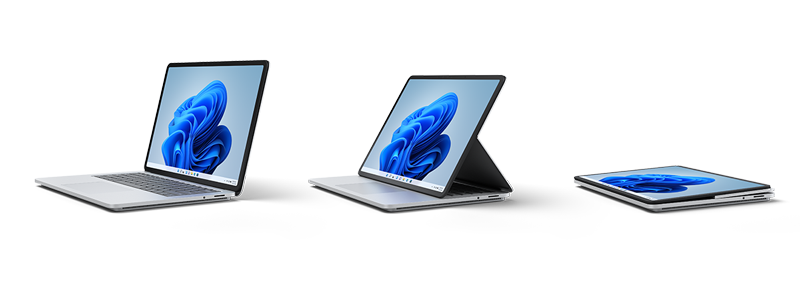
The Surface Pro 9’s kickstand design enables Studio Mode, where the device can be angled low for sketching or writing. This setup feels stable and ergonomic, reducing wrist strain during long drawing sessions. While it’s not a direct competitor to professional drawing tablets like the Wacom Cintiq, it’s highly practical for casual to intermediate artists, design students, or professionals sketching on the go.
Use Cases
Great For:
-
Sketching and Digital Art: Smooth stylus input and a high-refresh-rate display make it ideal for apps like Sketchable or Adobe Fresco.
-
Annotating and Prototyping: Perfect for marking up PDFs or creating UI/UX mockups in Figma.
-
Light Photo Editing: Handles blog graphics or basic edits in Photoshop and Lightroom well.
-
Portability: At 1.94 lbs, it’s easy to carry for on-the-go creative work.
Not Ideal For:
-
Color-Critical Work: The sRGB display limits its use for professional color grading or video editing.
-
Heavy 3D Work: Lacks the GPU power for 3D modeling or CAD software.
-
ARM-Specific Limitations: Non-optimized apps on the SQ3 model may frustrate users relying on desktop-grade software.
Verdict
The Microsoft Surface Pro 9 (Intel) is a compelling choice for creative hobbyists, design students, or professionals needing a portable, stylus-driven device. Its combination of a responsive Slim Pen 2, vibrant 120Hz display, and versatile form factor makes it a strong contender for sketching, prototyping, and light creative tasks. However, high-end professionals requiring color-accurate displays or GPU-intensive workflows may need a more specialized device.
Released in late 2022, the Microsoft Surface Pro 9 may not be brand new, but it still stands as Microsoft’s most recent entry in the Surface Pro lineup as of mid-2025. It continues to be a compelling hybrid device especially for creative users looking for flexibility and portability.
Tip: If you’re considering the ARM model, ensure your software is compatible to avoid performance hiccups.
About the Author: Aditi Sharma

Disclaimer
Techizta publishes content submitted by third-party agencies, partners, and clients. Any such posts are categorized and tagged accordingly:
- Sponsored Content: Posts labeled as "Sponsored" are paid placements submitted by third-party agencies or clients. Techizta does not endorse or express any views regarding the information contained in these posts. The opinions expressed belong solely to the respective authors and do not reflect the official policy or position of Techizta.
- Press Releases: Posts labeled as "Press Release" are paid PR submissions provided by our partners and clients. These are published as received and should be considered as promotional content.
The information provided in such posts is strictly for informational purposes only and should not be interpreted as buying recommendation, or professional advice. Techizta does not recommend, endorse, or promote any specific products, services, or companies mentioned. Readers are strongly encouraged to conduct independent research and consult with a qualified professional before making any decisions.
Additionally, all featured images accompanying such posts are intended as creative depictions of the subject matter. There is no intent to offend or misrepresent any individual, institution, or entity. If any content or imagery is found to be objectionable, please reach out to us at [email protected], and we will promptly review the concern.



Get Smart Insights In Inbox
Stay ahead of the curve with expert analysis and latest smart tech updates.